Free Wedding Guest List Template
One sheet for every guest, from the first draft of the list to the last thank-you note: household, side, contact details, save the date and invitation status, RSVP, adults and children, meal choice, dietary needs, table and gifts. The Summary tab counts yes, no and pending replies and your total headcount automatically.
Download
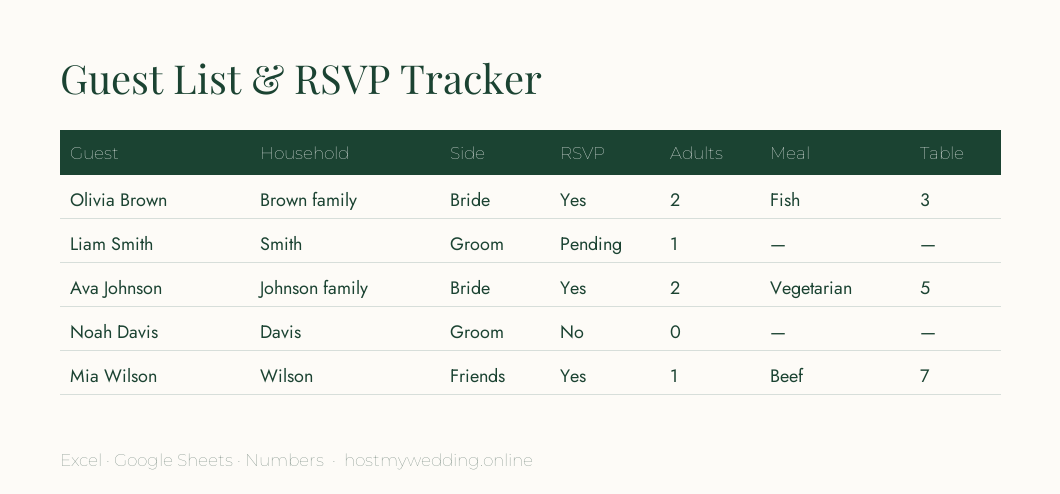
- Download: Guest list & RSVP tracker (Excel / Google Sheets)
- Download: Guest list (CSV, for import) (CSV)
Columns included
| Column | Use it for |
|---|---|
| Guest name / Party | One row per person, grouped by household for invitations |
| Side / Relationship | Balance the list between families and friends |
| Email / Phone / Address | Save the dates, invitations and thank-you notes |
| Save the date / Invitation sent | Never miss or double-send |
| RSVP · Adults · Children | Live headcount on the Summary tab |
| Meal choice · Dietary needs | Final numbers for the caterer |
| Table | Seating chart |
| Gift received · Thank-you sent | Thank-you notes within three months |
Guest list tips
- Start with three tiers — must invite, should invite, nice to invite — and cut from the bottom.
- Decide plus-one and children rules before you write the list, then apply them to everyone.
- Collect addresses early with a quick form or message; it's the slowest part.
- Use RSVP online — replies land in one place and the headcount updates itself.
Frequently asked questions
How do I organise a wedding guest list?
Use one row per guest with a household column for grouping, plus columns for side, contact details, RSVP, meals and table. This template includes all of them.
Can I use this guest list template in Google Sheets?
Yes. Upload the .xlsx to Google Drive and open it with Google Sheets, or import the CSV.
How many guests should I invite?
Start from your venue capacity and budget per guest. Expect around 10–20% of invited guests to decline, more for destination weddings.