Wedding Guest List Template for Google Sheets
Download the template, upload it to Google Drive and open it with Google Sheets — the RSVP counts and headcount formulas keep working. Then share it with your partner (and family, as viewers or commenters) so everyone works from one list instead of WhatsApp messages and screenshots.
Download the template
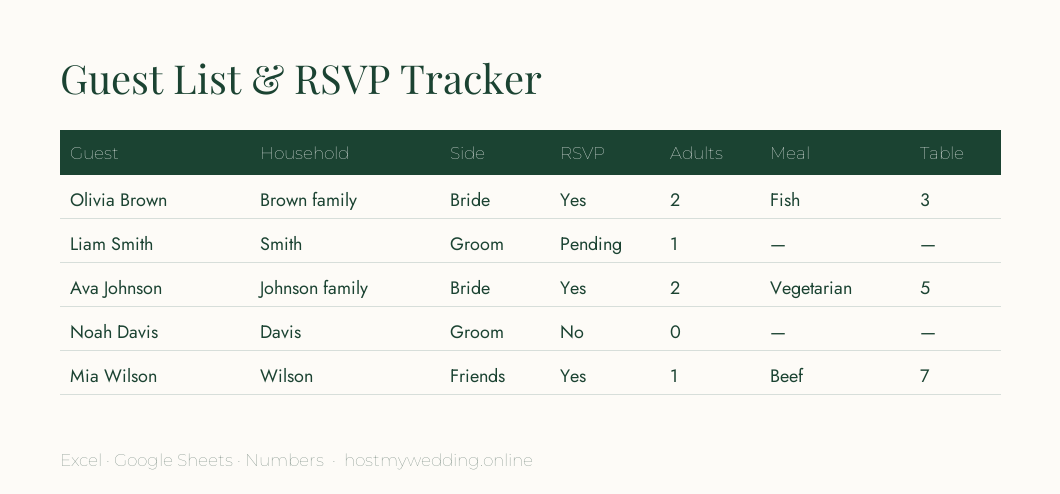
- Download: Guest list & RSVP tracker (.xlsx — opens in Google Sheets) (Google Sheets / Excel)
- Download: Guest list (CSV) (CSV)
Open it in Google Sheets
- Download. Save the .xlsx file above to your computer or phone.
- Upload to Drive. In Google Drive, choose New → File upload and pick the file.
- Open with Sheets. Double-click it, then choose File → Save as Google Sheets so it becomes a native sheet.
- Share. Click Share: your partner as Editor, parents as Commenter if you want suggestions without accidental edits.
- Fill it in. One row per guest; use the Household column to group invitations.
Make it work harder in Sheets
- Add dropdowns: select the RSVP column, then Data → Data validation → Dropdown with Yes, No, Pending.
- Colour-code replies: Format → Conditional formatting, green for Yes and red for No.
- Filter views let each family member see only their side without changing what others see.
- The Summary tab counts yes, no and pending replies and adds up adults and children automatically.
- Turn on version history (File → Version history) before big edits so nothing is lost.
Frequently asked questions
Is there a free wedding guest list template for Google Sheets?
Yes — download the template on this page, upload it to Google Drive and open it with Google Sheets. It is free and needs no sign-up.
Do the formulas work in Google Sheets?
Yes. The COUNTIF and SUMIF formulas on the Summary tab work the same in Google Sheets as in Excel.
How do I share a guest list with my family without them editing it?
Share the sheet with family as Commenters or Viewers, and give only your partner Editor access.