Free Wedding Budget Spreadsheet
Enter your total budget and guest count and the spreadsheet does the rest: cost per guest, a suggested amount for each of 12 categories, totals for budgeted, quoted and paid, what's left to pay, and whether you are over or under budget. A second tab tracks every vendor deposit and balance.
Download
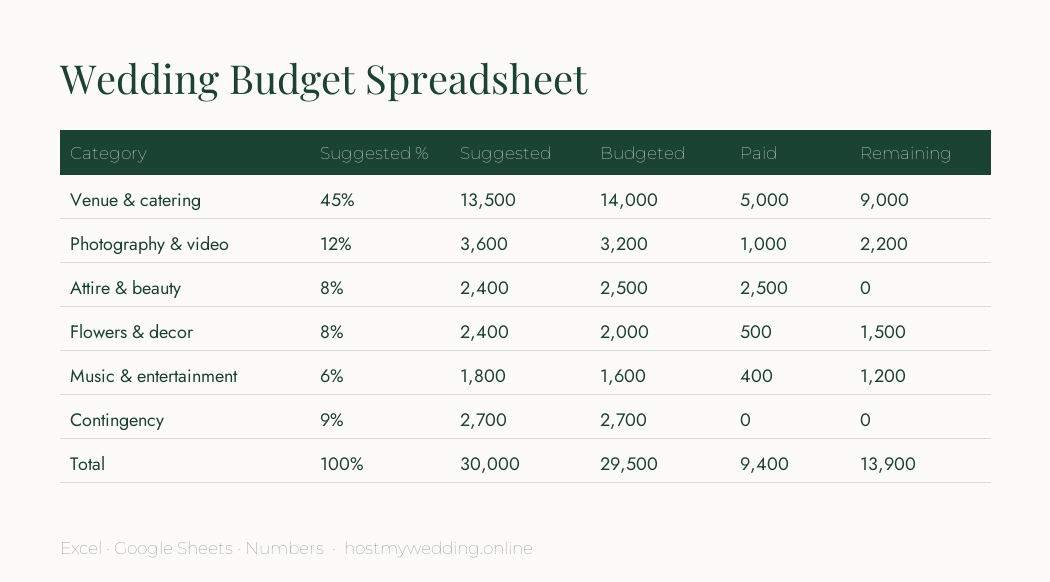
- Download: Wedding budget spreadsheet (Excel / Google Sheets)
- Download: Printable budget worksheet (PDF)
Suggested starting split
A starting point, not a rule — move money towards what matters most to you.
| Category | Share of budget |
|---|---|
| Venue & catering | 45% |
| Photography & video | 12% |
| Attire & beauty | 8% |
| Flowers & decor | 8% |
| Music & entertainment | 6% |
| Rings | 3% |
| Stationery & website | 2% |
| Transport | 2% |
| Cake & desserts | 2% |
| Favours & gifts | 2% |
| Officiant & licence | 1% |
| Contingency | 9% |
How to use it in Google Sheets
- Upload the .xlsx file to Google Drive, then open it with Google Sheets.
- Change the total budget (cell B1) and guest count (B2); the suggested amounts update automatically.
- Fill in "Budgeted" as you decide, "Quoted" when vendors reply, and "Paid" as you pay.
- Use the Payments tab for deposits and balance due dates, and add them to your calendar.
- Share the sheet with your partner and anyone contributing, with edit or view access.
Budgeting tips that actually save money
Guest count drives most costs: venue size, catering, rentals, stationery and favours all scale with it. Cutting ten guests usually saves more than any single vendor negotiation.
Keep a contingency of 5–10%. Overtime charges, extra rentals and last-minute guests add up, and having the buffer stops one surprise from derailing the plan.
Ask every vendor what is included, what tax and service charges apply, and when balances are due — then record it in the Payments tab so nothing is missed.
Frequently asked questions
How do I make a wedding budget spreadsheet?
List your categories, set a total, assign each category a share, then track budgeted, quoted and paid amounts. This template does all of that with formulas already in place.
Does this work in Google Sheets?
Yes — upload the .xlsx file to Google Drive and open it with Google Sheets; the formulas work as-is.
How much contingency should a wedding budget have?
Plan for 5–10% of the total. The template starts at 9%.